


Recurring Donations for Shopify Stores: What It Is and How to Do It
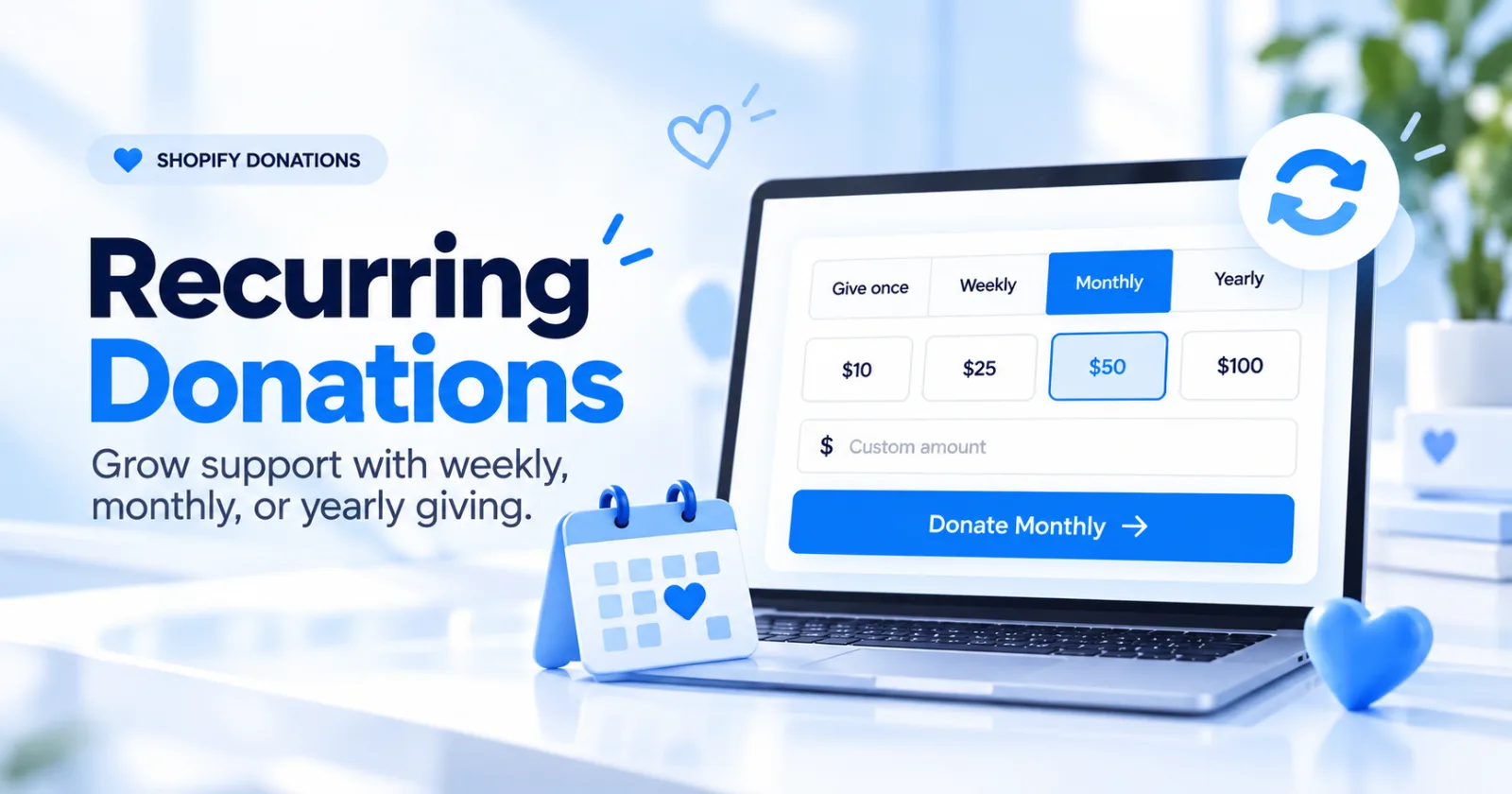
Most donations on a Shopify store happen once. A shopper sees your cause, feels something, taps a preset amount, and checks out. Then they're gone, and next month you're back to square one, asking all over again.
Recurring donations fix that. A supporter says "yes" one time, and their gift repeats every day, week, month, or year on its own. Donate Now, the complete Shopify donation app, now supports recurring giving inside the same donation widget your supporters already use. This guide explains what recurring donations are, why they matter, and how to set them up step by step.
Key Takeaways
Shopify can't take recurring donations on its own. Donate Now adds daily, weekly, monthly, and yearly giving next to one-time gifts, all in one widget.
Recurring donors stay. Their retention holds between 78% and 80%, compared with 32.41% for one-time donors (Neon One).
They're worth about twice as much. In 2025, the average recurring donor's lifetime value was $7,288, compared with $3,607 for non-recurring donors.
October to December is when most recurring gifts start, so launch before Giving Tuesday on December 1, 2026.
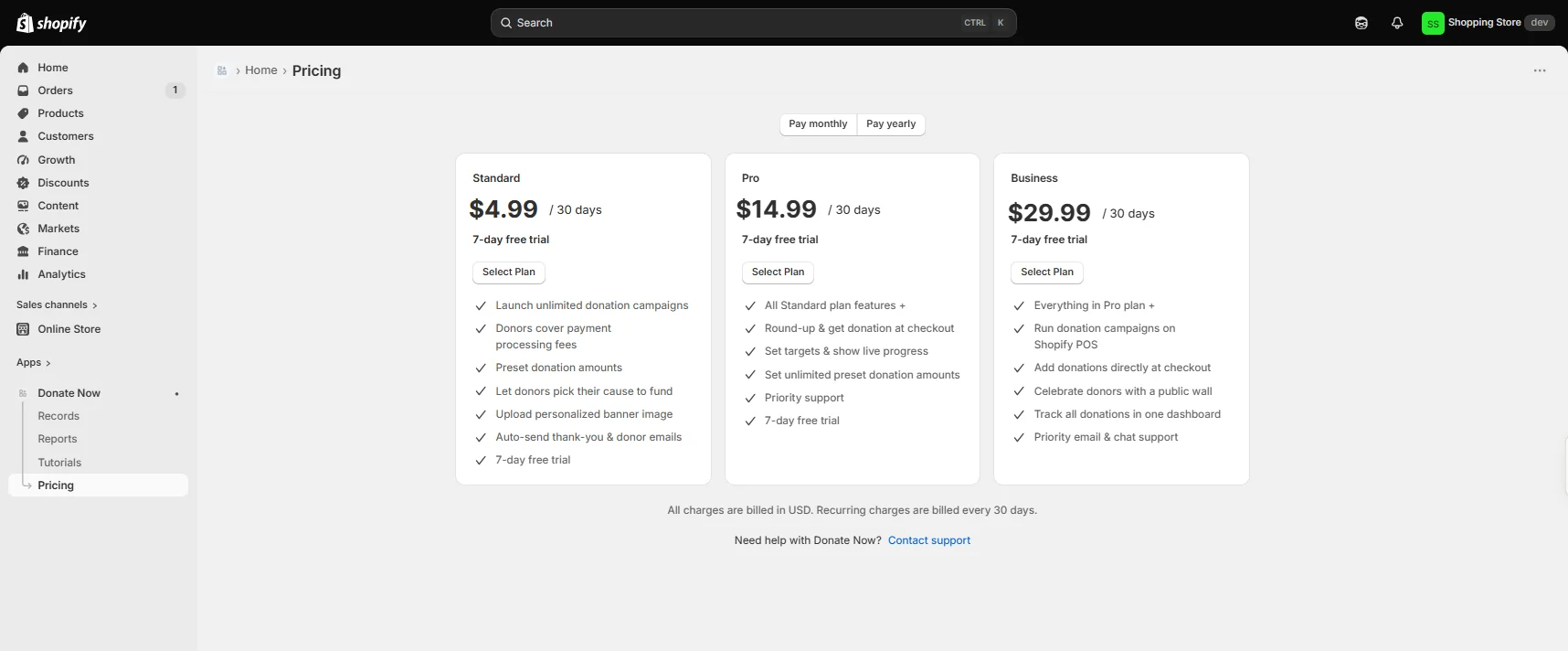
Recurring donations come with Donate Now's Business plan ($29.99/month), and every plan starts with a 7-day free trial.
Everything You Need to Know About Recurring Donations
Here's the whole topic in one table.
Question | Short answer |
|---|---|
What is Recurring Donations in Shopify? | A donation that repeats on a schedule until the donor stops it |
Does Shopify offer Recurring Donations? | No. Shopify's only built-in "donation" is relabeled checkout tipping, which is one-time only. |
What do I need? | A donation app with recurring giving built in |
Best app for Recurring Donations? | Donate Now: daily, weekly, monthly, and yearly giving in one widget, next to one-time gifts |
The cost to set up Recurring Donations in Shopify? | Donate Now Business: $29.99/month or $299.99/year, with a 7-day free trial |
Setup time | A few minutes, no code |
Why bother? | Recurring donors stay for years and give you steady income |
Best time to launch Recurring Donations | Before Giving Tuesday, December 1, 2026 |
What Is a Recurring Donation?
A recurring donation is a gift that repeats on a fixed schedule. The donor picks three things one time:
How much to give, for example, $10
How often to give: daily, weekly, monthly, or yearly
Which cause to support
After that, the gift renews automatically until they stop it. Nobody has to fill out a form again.
Think of it like a streaming subscription, except the money goes to a good cause. $10 a month feels small to a donor. For your organization, it's $120 a year from one person, without asking twice.
How Can I Get Recurring Donations in Shopify?
Shopify has no built-in way to do this. Its only native "donation" option is checkout tipping with the labels changed, and that's one-time only and tied to a purchase. We explain this gap in our Shopify for nonprofits guide.
So you have three choices:
Use a donation app with recurring giving built in. This is the easiest path. With Donate Now, you switch on recurring donations inside your campaign, and that's it.
Combine a subscription app with a "donation product." Shopify's free Subscriptions app is made for products like coffee refills, not donations. You'd have to fake a donation as a product and lose custom amounts, cause selection, and goal tracking.
Send donors to an outside platform. Tools like Donorbox can take recurring gifts, but donors leave your store, and your data ends up in two places.
Quick check before you start: any recurring payment on Shopify needs a payment gateway that can charge donors automatically. Supported gateways include Shopify Payments, PayPal Express, Authorize.net, Adyen, and Stripe, depending on your region (Shopify Help Center).
Recurring Giving in Donate Now
Donate Now now lets supporters give daily, weekly, monthly, or yearly from the same donation widget they already use.
Feature | What it does |
|---|---|
Frequency toggle | Donors choose Give Once, Daily, Weekly, Monthly, or Yearly in one tap |
Preset and custom amounts | Your preset buttons and custom amount field work on a schedule |
Cause selection | Donors pick which cause their recurring gift supports |
Processing fee coverage | Donors can still cover fees, so the full gift reaches your cause |
Campaign goals and progress | Recurring gifts count toward the same campaign, goal bar, and branding |
Give Once, Daily, Weekly, Monthly, or Yearly
The frequency toggle sits at the top of the widget. "Give Once" stays the default, so nobody feels pushed. Donors who want to do more get a clear, one-tap way to say yes.
Daily and weekly giving are rare among Shopify donation apps. They suit churches, food banks, and community drives that run on small, regular gifts.
Same Widget, Nothing to Rebuild
Already running campaigns with Donate Now? You don't start over. Your banner, causes, preset amounts, and fee coverage carry straight into recurring giving. Just switch it on.
How Many Shopify Apps Provide Recurring Donations?
Not many. Most Shopify donation apps focus on round-ups or donating a share of sales to partner charities. Only a small group lets you collect your own recurring donations.
Option | Recurring giving | What to know |
|---|---|---|
Daily, weekly, monthly, yearly + one-time | Flat monthly price, no cut of donations. Also includes round-up, POS donations, goals, and a donor wall. | |
DonateMate | Recurring giving | Plans have monthly donation limits, with a 0.75–1% transaction fee above them |
Give & Grow | Recurring giving | Built around recurring giving and charity-platform connections |
Donorbox, Tithe.ly | Recurring giving | External donation platforms connected to your store |
Shopify Subscriptions + donation product | Workaround | Built for product subscriptions, not donations |
The difference with Donate Now is simple: you never pay a percentage of your donations, and you don't need two or three apps to get a full setup.
Why Should You Have a Recurring Donations Feature?
Here are the 5 top benefits of recurring donation feature in your Shopify store.
1. Recurring Donors Stay for Years
Neon One studied 4,107 nonprofits. Recurring donor retention held between 78% and 80%, while one-time donor retention fell to 32.41%. The average recurring donor stays for 7.77 years, compared with 1.7 years for non-recurring donors.
The M+R Benchmarks 2026 study shows the same pattern: 71% of monthly donors were still giving after one year, compared with 24% of new one-time donors.
2. Each Donor Is Worth About Twice as Much
In 2025, the average recurring donor's lifetime value was $7,288, compared with $3,607 for non-recurring donors. Recurring donors also give about $938 a year on average.
3. Predictable Income You Can Plan Around
One-time gifts spike during campaigns and vanish in between. Monthly giving makes up 27% of all online nonprofit revenue. That's money you can count on for staff, supplies, and programs.
4. Less Asking, More Impact
Every one-time campaign means building the appeal from scratch. A recurring donor says yes once, so your team can focus on the work instead of the next ask.
5. Easier for Donors
$10 a month feels lighter than $120 at once, even though it's the same amount. Recurring giving lets supporters do more without stretching their budget.
How to Set Up Recurring Donations in Shopify (Step by Step)
You can do this in a few minutes with Donate Now. No code, no developer.
Watch the setup in under 4 minutes:
Step 1: Install Donate Now and Pick the Business Plan
Install Donate Now from the Shopify App Store. When the pricing screen appears, choose Business, the plan with recurring donations. It starts with a 7-day free trial.
Step 2: Create a Donation Campaign
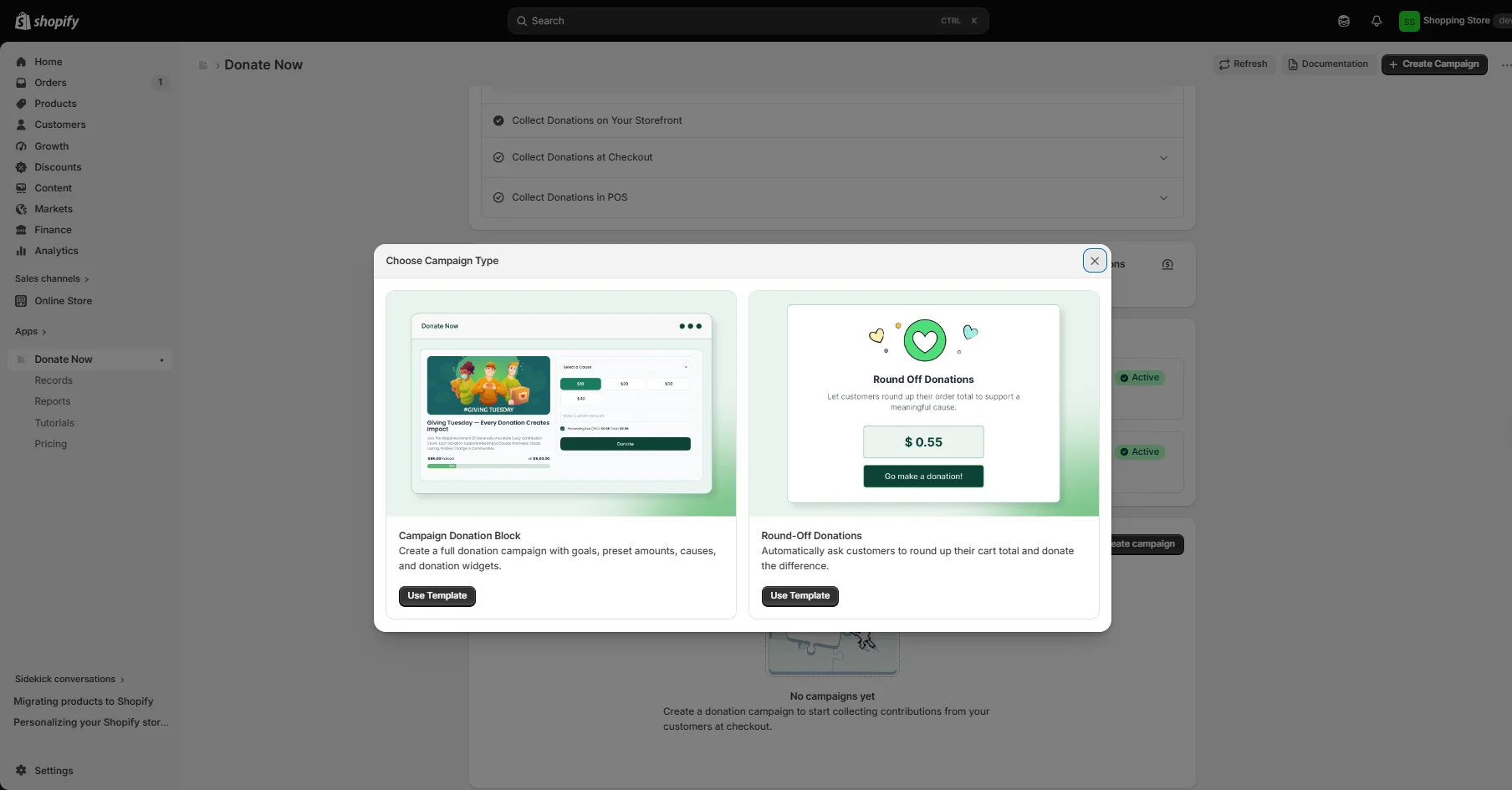
Go to Donate Now > Create Campaign and choose Campaign Donation Block.
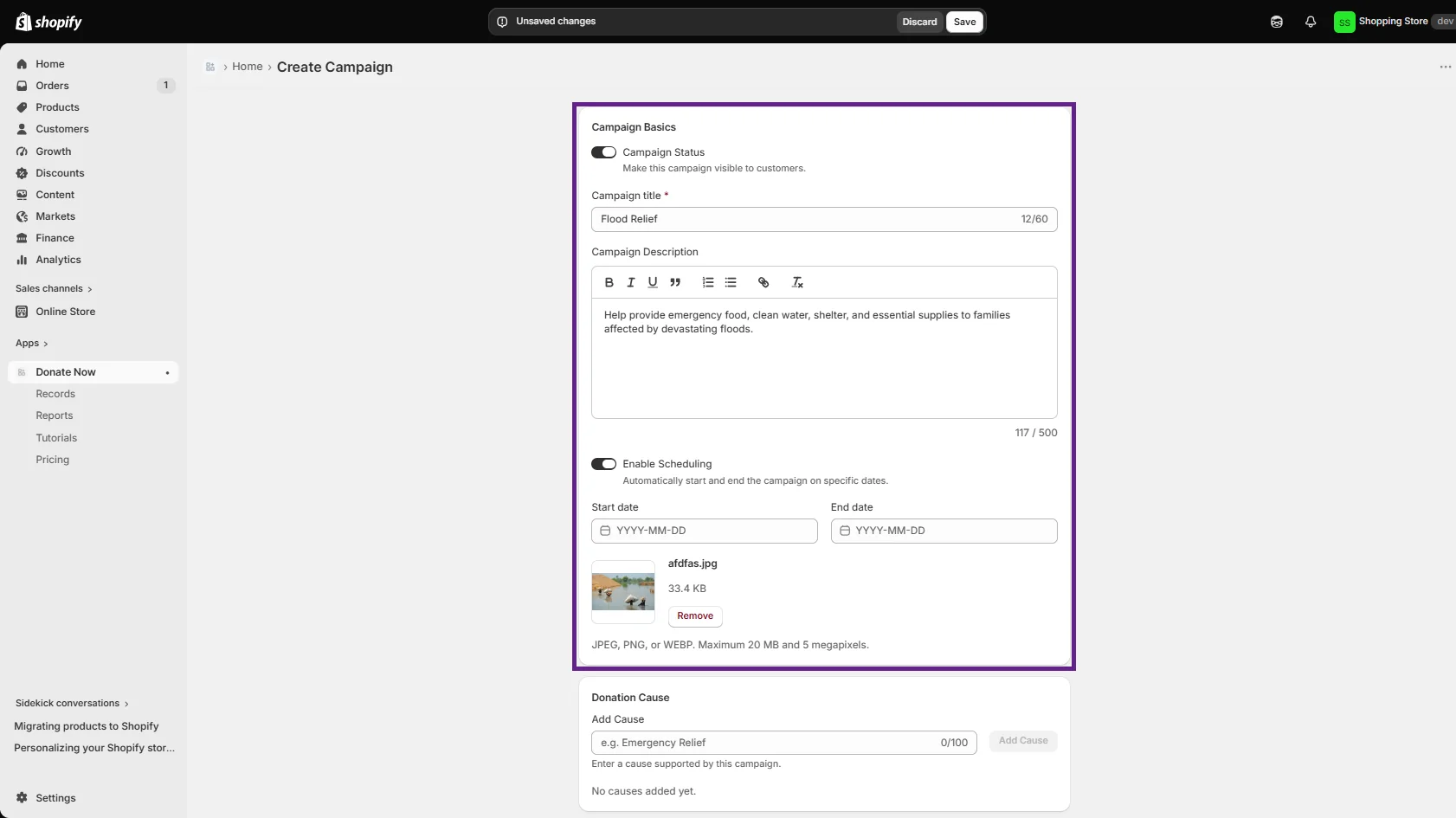
Add a campaign title, a short description, and a campaign image. Turn Campaign Status on when you're ready. You can also turn on Scheduling so the campaign starts and ends on its own.
Step 3: Add Your Causes
In Donation Cause, add one or more causes, such as "Food Bank" or "Medical Aid." Donors pick the one they want to support.
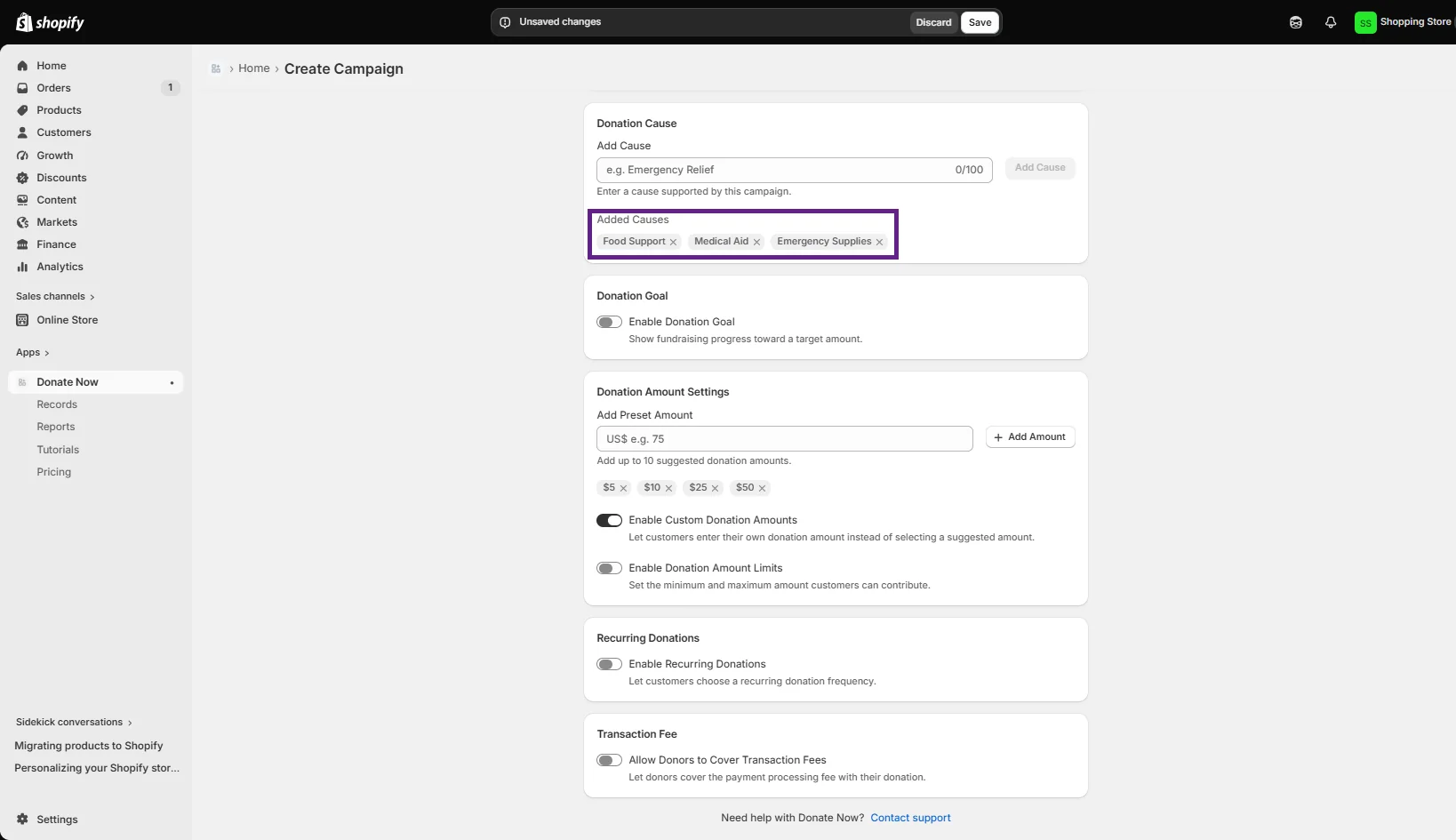
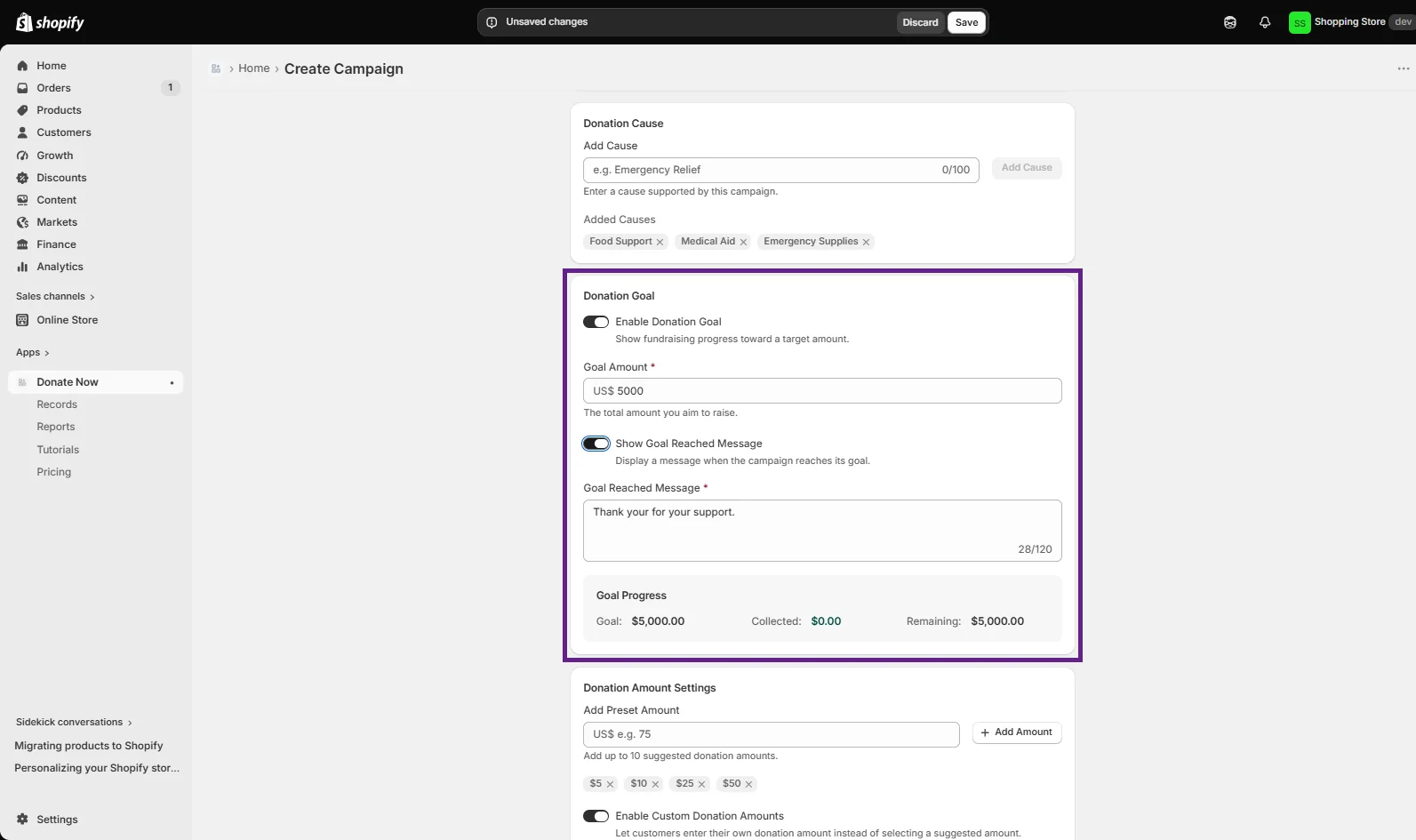
Step 4: Set a Goal
Turn on Donation Goal, enter your target, and switch on Show Goal Reached Message. A progress bar shows donors how close you are.
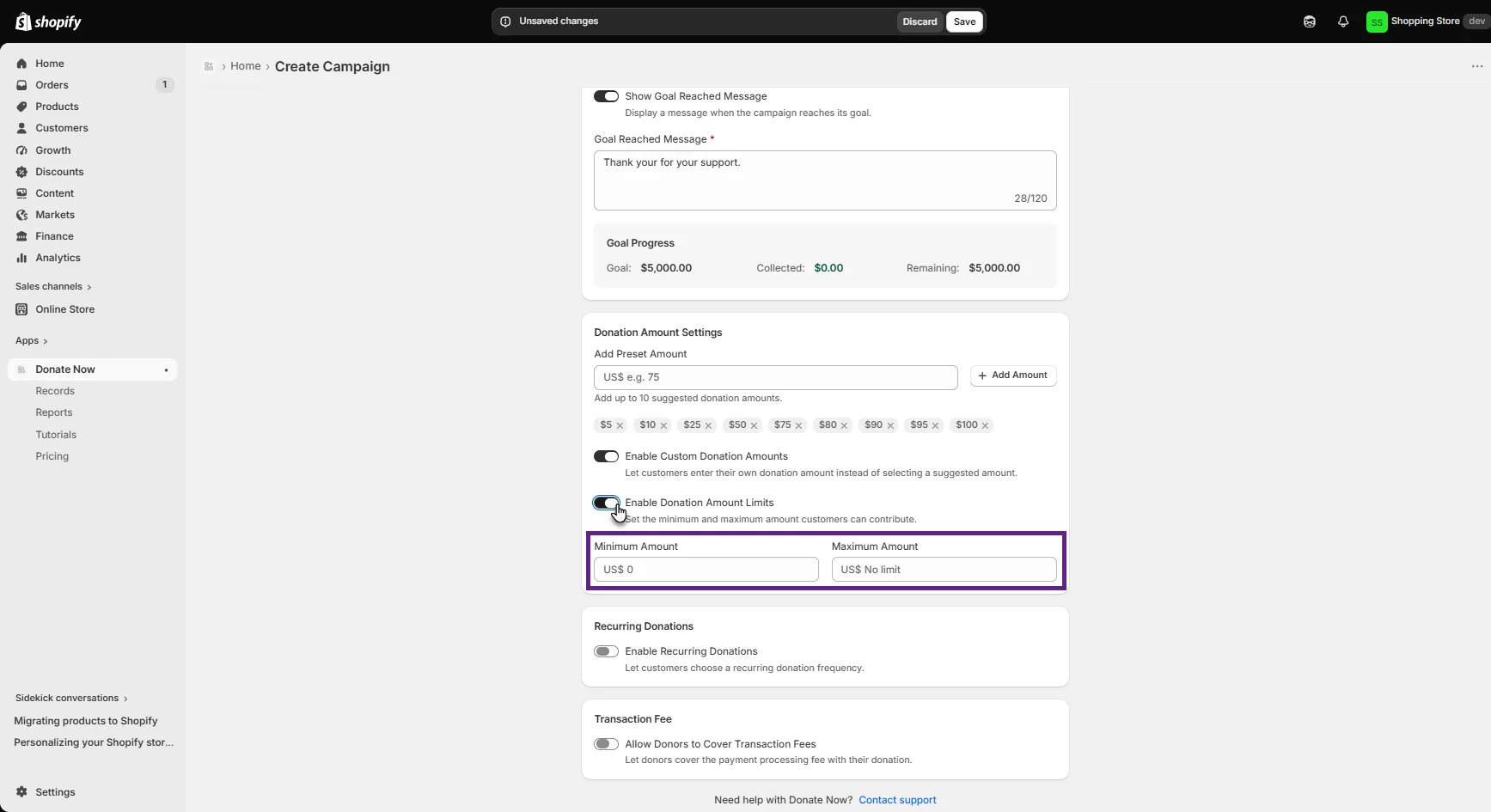
Step 5: Set Your Donation Amounts
Add up to 10 preset amounts, turn on Custom Donation Amounts so donors can type their own, and optionally set a minimum and maximum.
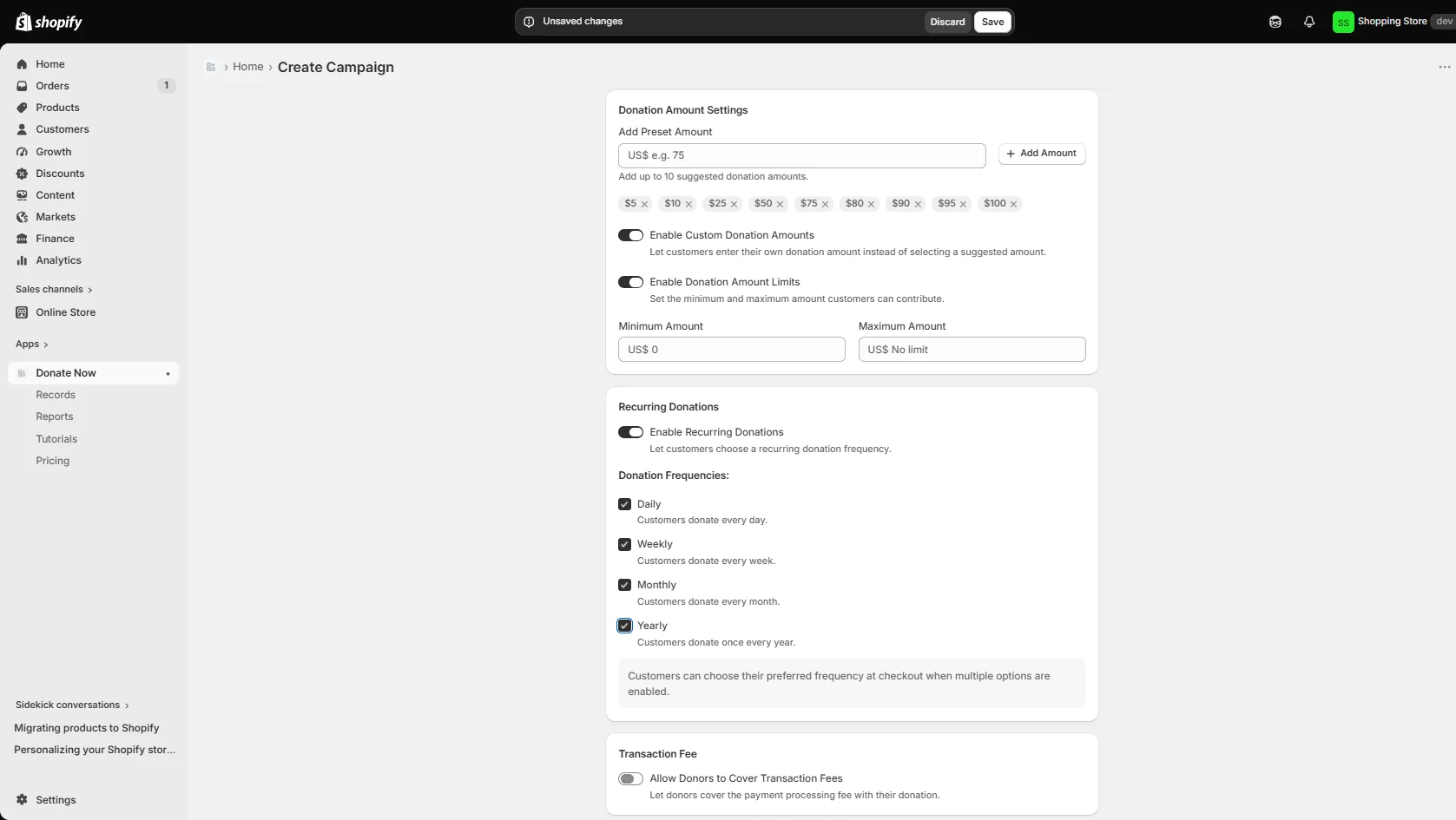
Step 6: Turn On Recurring Donations
Switch on Enable Recurring Donations, then choose your frequencies: Daily, Weekly, Monthly, and/or Yearly. If you turn on more than one, donors pick the one they prefer.
Step 7: Let Donors Cover Fees
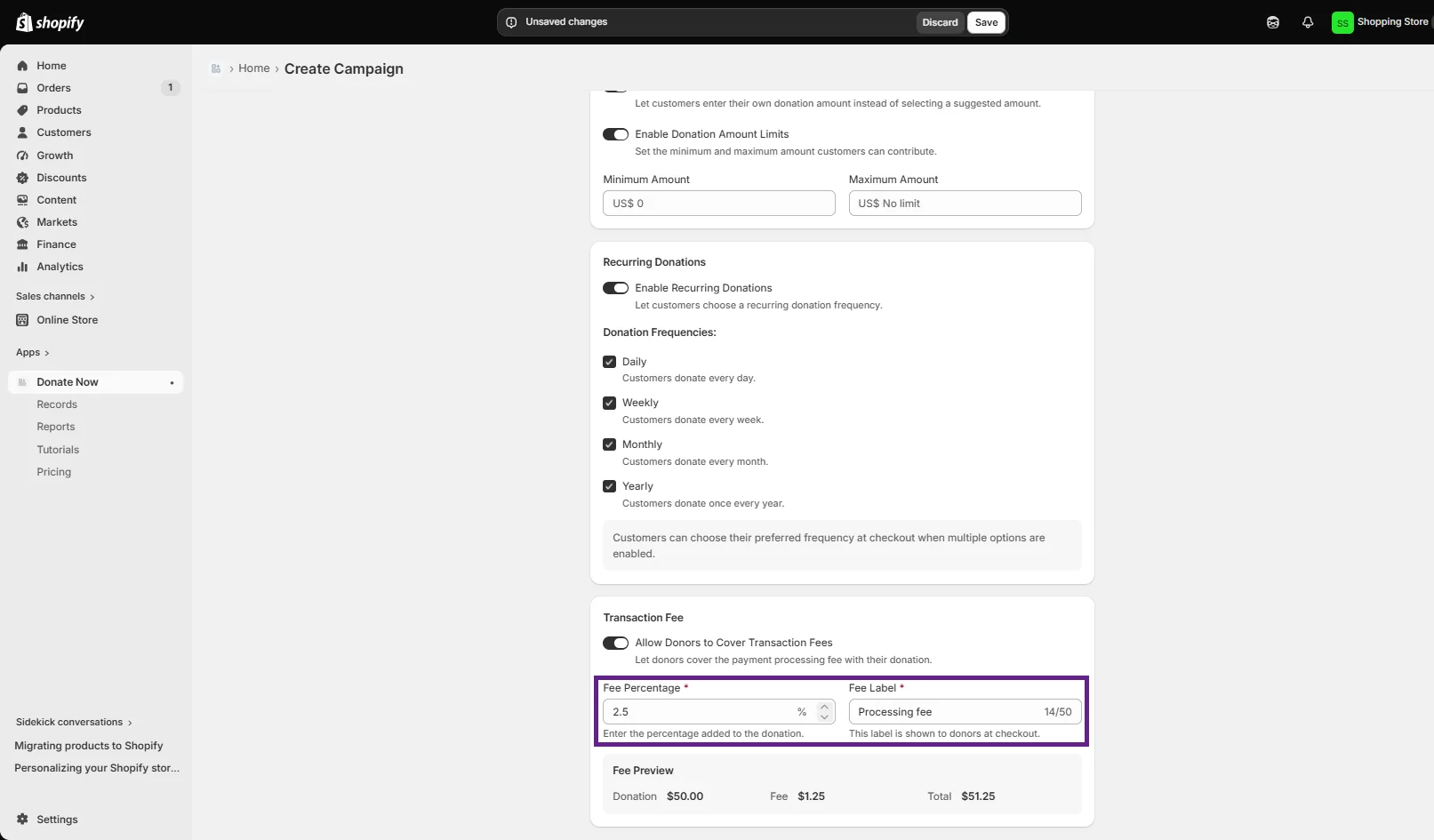
Switch on Allow Donors to Cover Transaction Fees. Set the fee percentage and write a friendly label, for example "Processing fee." The fee preview shows exactly what the donor pays.
Step 8: Add the Campaign to Your Store
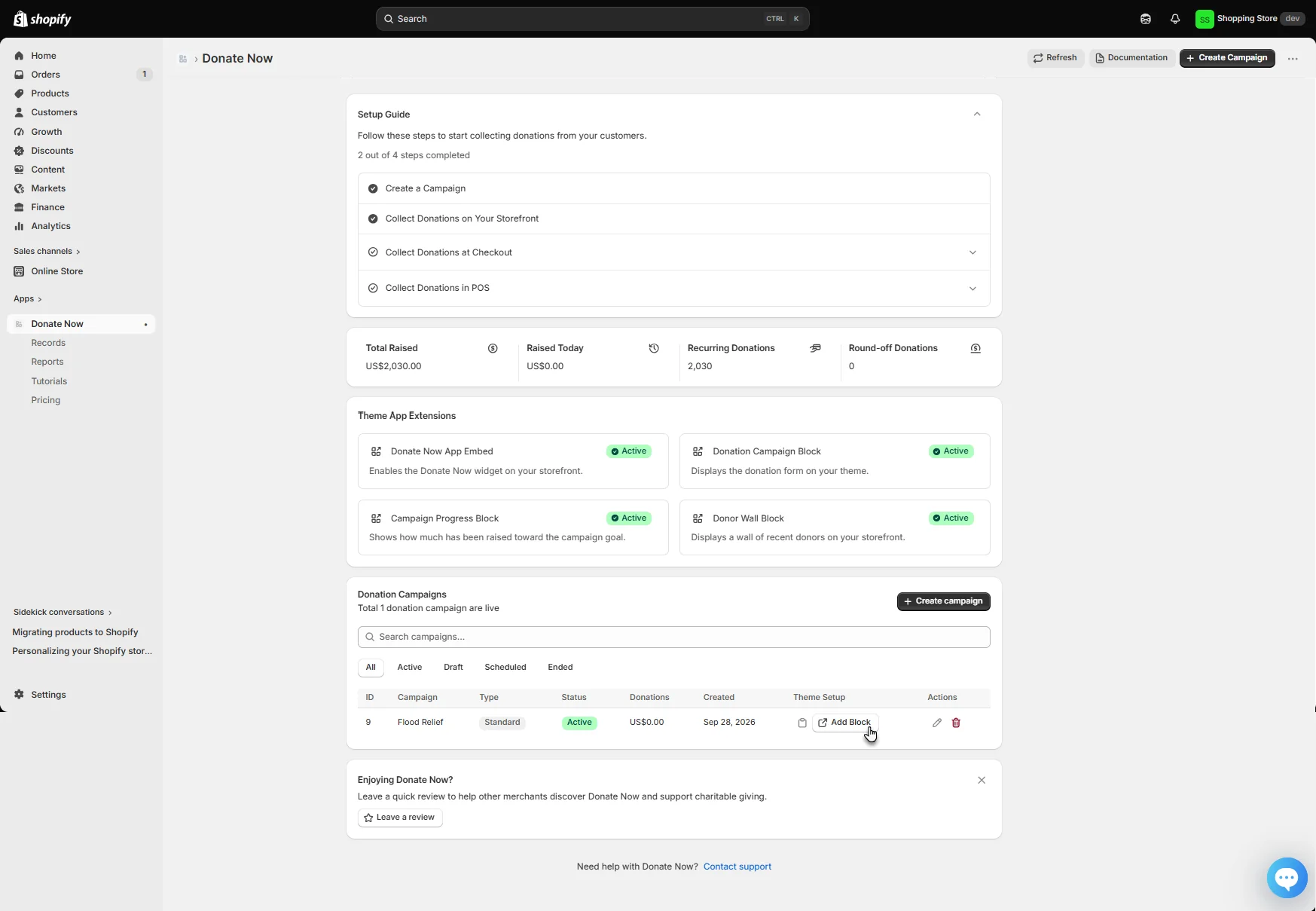
Click Save. Your campaign appears in the Donation Campaigns table. Under Theme Setup, click Add Block (or copy the Campaign ID).
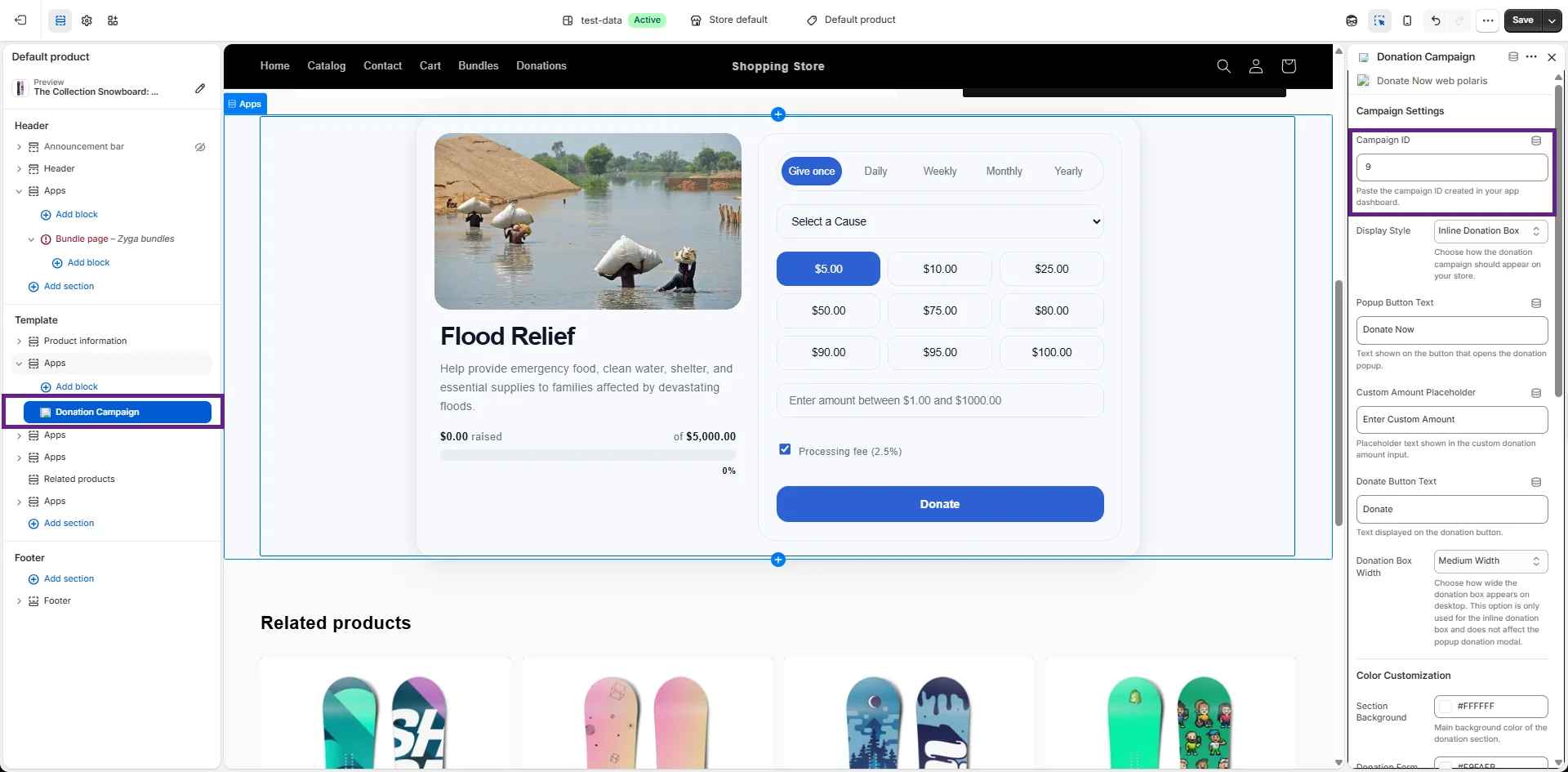
The Shopify theme editor opens. Add the Donation Campaign block, paste your Campaign ID, and click Save.
Step 9: Test It Like a Donor
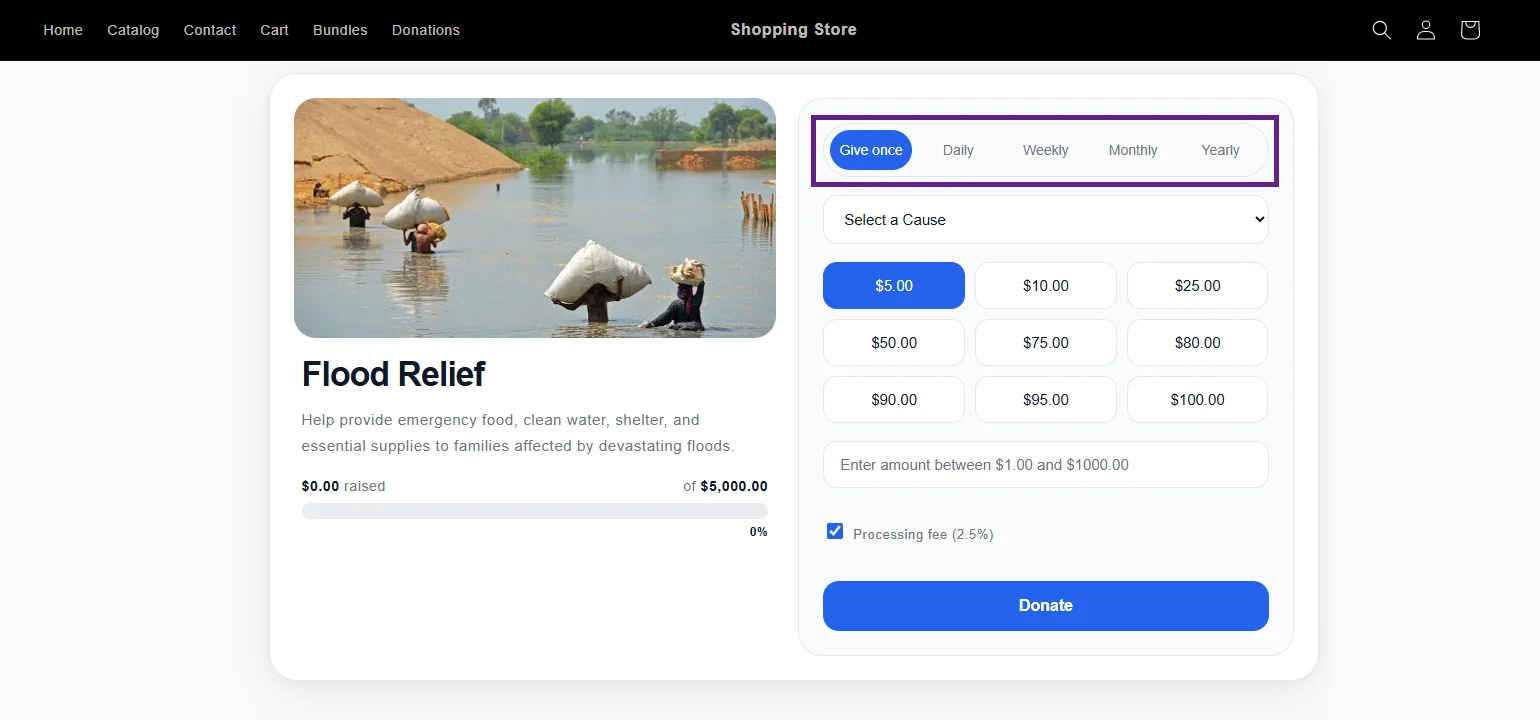
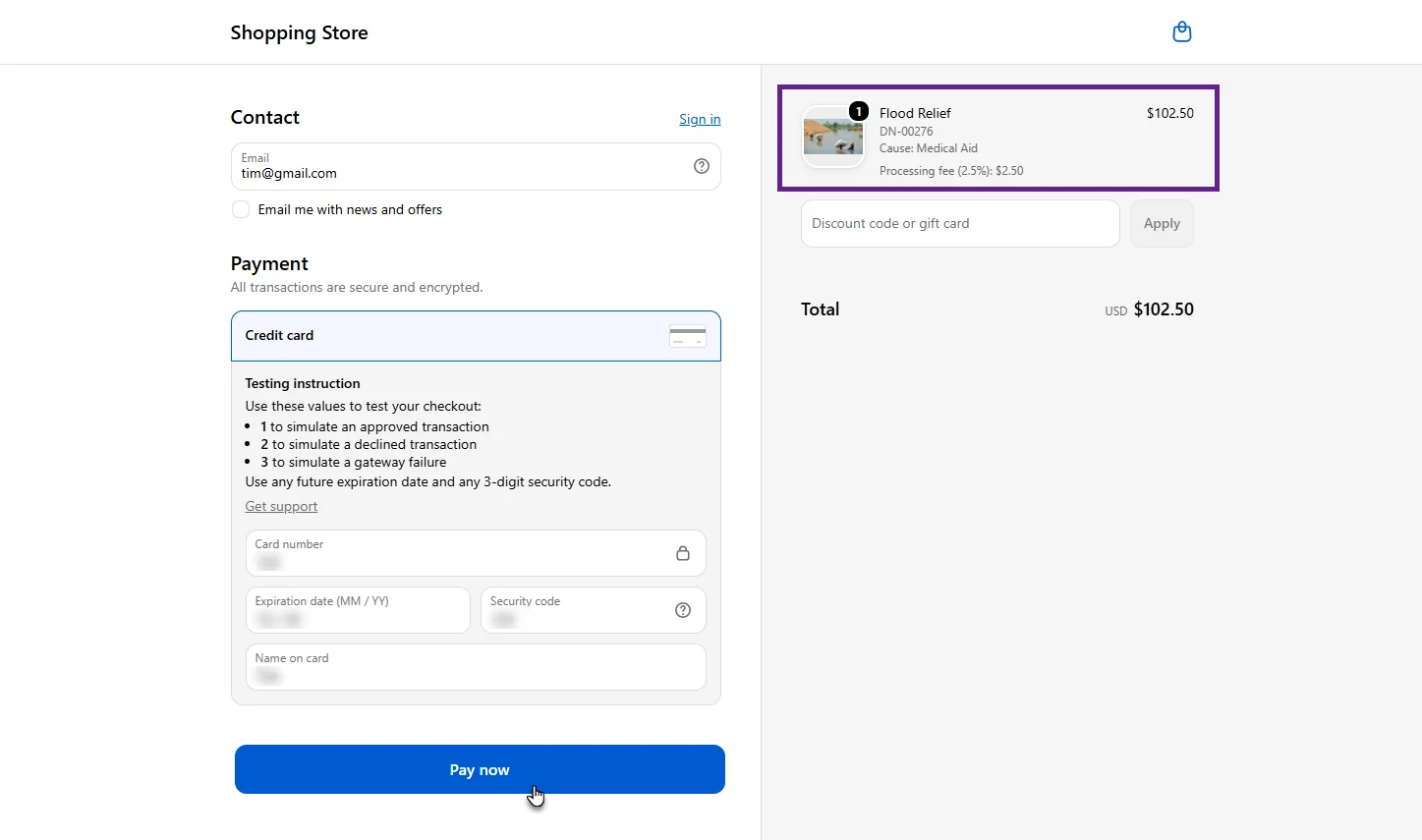
Open your store. The frequency options appear at the top of the donation block, with Give Once selected by default. Pick a frequency, a cause, and an amount, then click Donate.
You'll go straight to Shopify checkout. The donation shows as one clean line item with the cause and processing fee.
Step 10: Track Your Recurring Donors
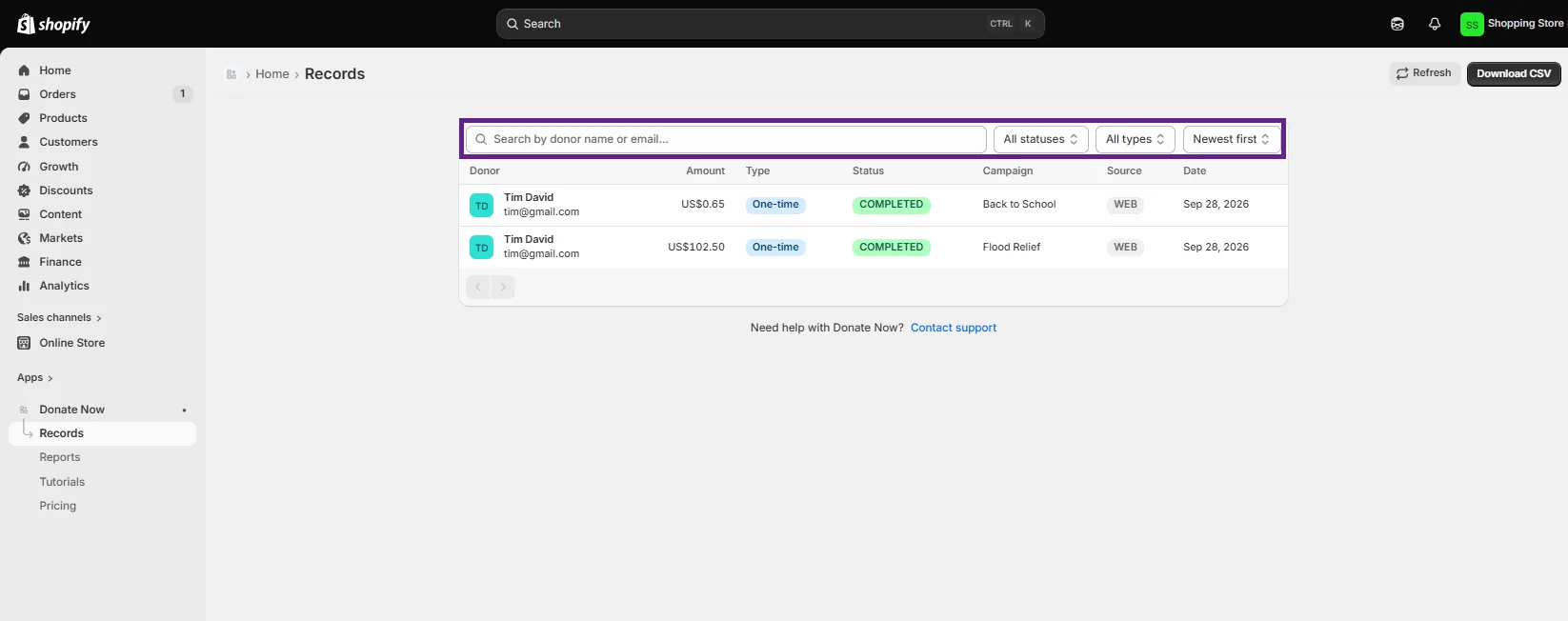
Go to Donate Now > Records. Filter by Type: Recurring and by Status: Active, Paused, Failed, Canceled, or Completed. Click Download CSV to export your records anytime. Your Home dashboard also shows recurring donation totals at a glance.
Need more detail? See the Donate Now documentation or try the live demo store.
Should I Set Up Recurring Donations Before Giving Tuesday 2026?
Yes, and the sooner the better. Giving Tuesday is on Tuesday, December 1, 2026. Here's why it's the perfect moment:
It's huge. On Giving Tuesday 2025, Americans gave an estimated $4.0 billion, up 13% from 2024.
Its donors are loyal. 65% of 2024 Giving Tuesday donors gave again in 2025, compared with 52% of donors who gave earlier in the year.
The timing fits. October, November, and December are the top three months for new recurring gifts. In the month Giving Tuesday falls, about 12% of all new recurring gifts start on Giving Tuesday itself.
People who give on Giving Tuesday are already in a generous mood, and they tend to stay. That makes it the best day of the year to ask: "Want to make this monthly?"
Simple plan:
By mid-November: launch your recurring campaign and test checkout.
On Giving Tuesday: promote the monthly option everywhere.
In December: thank every new monthly donor.
Get the full timeline in our Giving Tuesday preparation guide.
Why Donate Now Is the Best Recurring Donation App for Shopify
Most donation apps solve one piece of the puzzle: a donate button, or round-up, or recurring giving. Donate Now runs your whole donation setup from one place, online and at the counter, for one flat monthly price. Shopify merchants have raised more than $1.2M with Donate Now, and it's rated 5.0 on the Shopify App Store. Recurring donations are included in the Business plan at $29.99/month (or $299.99/year), with a 7-day free trial.
Daily, weekly, monthly, and yearly giving in one widget, next to one-time gifts
One clean line item for every donation, at any amount. No cart full of $1 items.
Donors can cover processing fees, so 100% of the intended gift reaches your cause
Online and in-store: run campaigns on your storefront and at Shopify POS
Round-up at checkout for shoppers who'd rather give spare change
Live goals and a public donor wall that keep momentum going
Records with status filters and CSV export, so you always know who's active, paused, or failed
Flat monthly pricing. Donate Now never takes a cut of your donations.
Real human support via live chat and WhatsApp, rated 5.0 on the Shopify App Store
Start your 7-day free trial · See all Donate Now features
Best Practices for Setting Up Recurring Donations in Shopify
Show what the money does each month. "$10/month feeds a family for a week" works better than just "$10/month."
Keep monthly amounts small. Start presets around $10, $25, and $50 per month. Small asks get more yeses.
Offer daily or weekly giving for community causes. Churches, food banks, and local drives often run on small, regular gifts.
Make the recurring option visible everywhere. 58.6% of recurring donors set up their gift without ever being asked. Put your donation block on your homepage, product pages, and cart. Our donate button guide shows the 5 best spots.
Turn on fee coverage. Donors like knowing their full gift reaches the cause.
Use a goal bar. People give more when they can see progress.
Say thank you fast. Set up a donation email with Shopify Flow so every donor hears from you right away.
Check Records every week. Look for failed payments and reach out kindly. An expired card shouldn't end a relationship.
Avoid These Mistakes for Recurring Donations in Shopify
Faking it with a product + subscription app. You lose custom amounts, causes, goals, and clean reporting.
Unclear labels. Always show "per month" or "per week" next to the amount. Surprise charges create unhappy donors.
Skipping the payment check. If your gateway doesn't support recurring billing, renewals can't be charged.
Forgetting to add the block. A campaign won't show until you add the Donation Block and paste the Campaign ID.
Never testing on a phone. Make a test donation on mobile before you promote anything.
Ignoring failed and paused donors. They're your easiest wins. A friendly reminder often brings them back.
Only asking, never updating. Tell recurring donors what their gifts achieved, not just what you need next.
Conclusion
Recurring donations turn one good moment into a long relationship. Shopify can't do it on its own, but Donate Now lets you offer daily, weekly, monthly, and yearly giving next to one-time gifts, round-ups, and in-store donations, all from one app, with no cut of your donations.
A few dozen recurring supporters give you a dependable base before your next appeal even begins. With Giving Tuesday on December 1, now is the time to switch it on.
Install Donate Now on Shopify and launch your first recurring donation campaign in minutes.
FAQs
Can you accept recurring donations on Shopify?
Not natively. Shopify's built-in tipping is one-time only. A donation app like Donate Now adds daily, weekly, monthly, and yearly recurring donations to your store.
What is the best Shopify app for recurring donations?
Donate Now is the best all-in-one option. It combines recurring and one-time gifts with round-up, POS donations, goal tracking, a donor wall, and fee coverage in a single app, for a flat monthly price.
Which Donate Now plan includes recurring donations?
The Business plan, at $29.99/month or $299.99/year. It comes with a 7-day free trial.
Can donors still make a one-time donation?
Yes. "Give Once" stays the default. Recurring is an extra option, not a requirement.
Can I take recurring donations at Shopify POS?
Donate Now's POS tools are built for in-person donations and round-ups. Recurring donations are set up through the donation block on your online store.
How do I see who is giving monthly?
Go to Donate Now > Records and filter by Type: Recurring. You can also filter by status (Active, Paused, Failed, Canceled, Completed) and export everything to CSV.
Article by
Muhammad JafferShopify & WooCommerce Expert
Muhammad Jaffer is a WooCommerce and Shopify expert with 7+ years in eCommerce development, SEO, and content. He builds conversion-focused storefront solutions and writes practical guides that help merchants turn traffic into revenue.
View all articlesDonate Now
Add Donate Now to your Shopify store
#1 Shopify donation app for one-time and recurring donations, checkout round-ups, and a donor wall. Donate Now works online and at Shopify POS.
There’s More to Read
More practical guides from the Objects team.
 Guides
How to Use Name-Your-Price on Shopify for BFCM 2026
Every store slashes prices over BFCM. Learn how to let shoppers name their price on selected Shopify products, protect your margin with a price floor, and set it up with Offer Your Price before November 27.
by Muhammad Jaffer · October 30, 2026
 Guides
10 BFCM Bundle Ideas for Shopify in 2026 (That Protect Your Margins)
Skip the sitewide discount. Here are 10 mix-and-match BFCM bundle ideas for apparel, beauty, food, pets, electronics, and gifts, plus a 7-step Zyga Bundles setup to go live before November 27.
by Muhammad Jaffer · October 29, 2026
 Guides
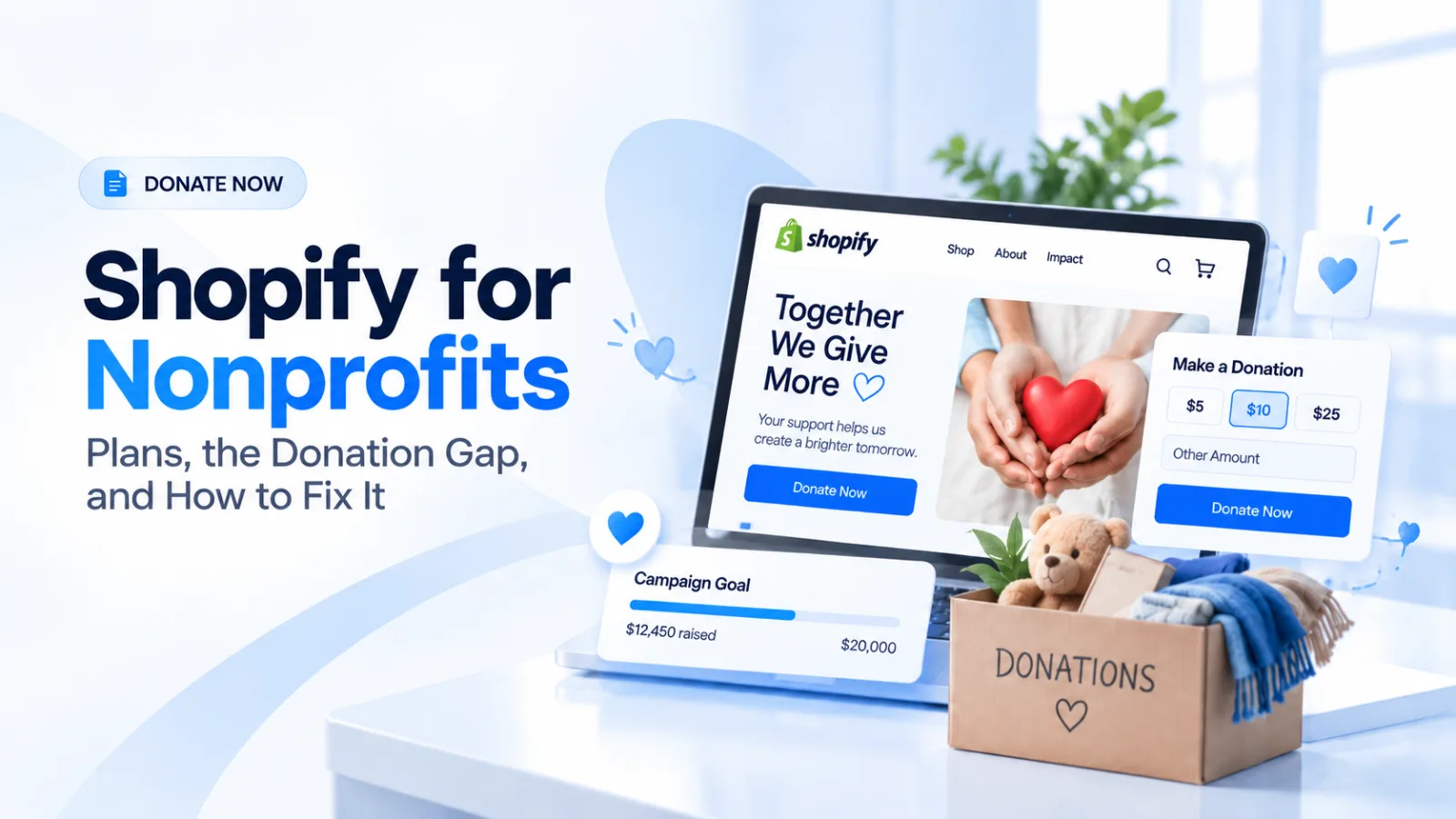
Shopify for Nonprofits (2026): Plans, the Donation Gap, and How to Fix It
Shopify works well for nonprofits selling merch and tickets, but its only native donation option is relabeled tipping. Here's what NPO plans include, where native donations fall short, and how to fix the gap online and in person.
by Muhammad Jaffer · October 4, 2026