


10 BFCM Bundle Ideas for Shopify in 2026 (That Protect Your Margins)
Black Friday shoppers aren't buying one thing. They're buying for their partner, their mom, their best friend, and themselves. Yet most Shopify stores still hand them one product, one price, and one "20% off" banner.
Bundles fix that. Instead of cutting the price of every item, you reward the shopper who builds a bigger basket. With Zyga Bundles, you can launch mix-and-match boxes, multi-packs, and free gifts right on your product pages.
Here are 10 BFCM bundle ideas you can copy for your store, plus a 7-step setup to get them live before November 27.
Key Takeaways
BFCM 2026 runs from Friday, November 27 to Monday, November 30. Last year, Shopify merchants sold a record $14.6 billion over the same weekend (Shopify).
Mix-and-match bundles protect your margin. One-item buyers pay full price. Five-item buyers get the deal.
Every idea below maps to a Zyga bundle type, from Build-Your-Own boxes to Buy X Get Y.
Build your bundles as drafts now, test them in mid-November, and switch them on for launch day.
Why Mix-and-Match Bundles Win on BFCM
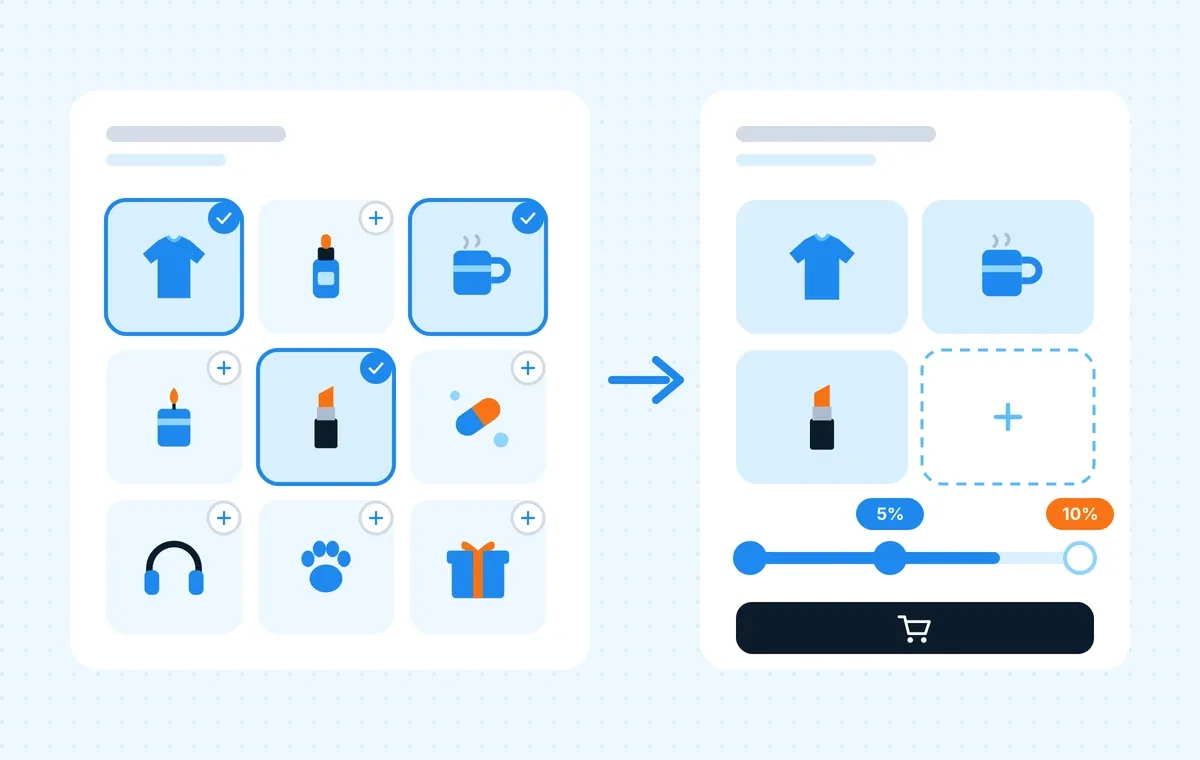
A fixed bundle says "take this box or leave it." A mix-and-match bundle says "build the box you want." During BFCM, that difference sells.
Gift lists in one cart. Shoppers pick different products, sizes, and colors in a single add to cart.
Bigger baskets, not deeper discounts. The deal rewards quantity, so you're not giving money away on single-item orders.
The offer lives on the product page. Zyga shows bundles inline, so shoppers never leave the page that already convinced them.
10 Shopify BFCM Bundle Ideas at a Glance
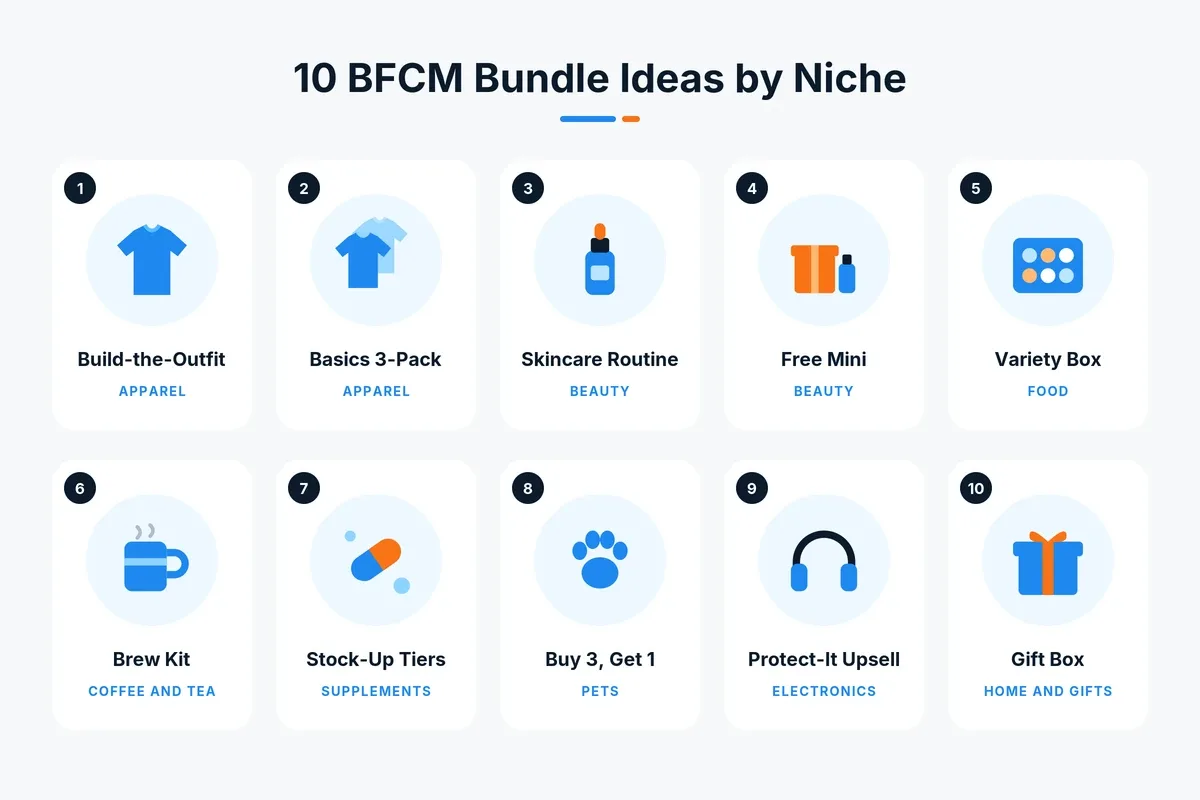
Use this table to shortlist the ideas that fit your catalog. The prices in this post are examples. Run your own numbers in the free Shopify Bundle Profit Calculator before you publish anything.
# | Bundle idea | Zyga bundle type | Pricing tactic |
|---|---|---|---|
1 | Build-the-Outfit (apparel) | Multi-Step Bundle | Full price + free gift |
2 | Mix-color 3-pack (apparel) | Quantity Break | % off per tier |
3 | Skincare routine box (beauty) | Build-Your-Own Bundle | Tiered % off |
4 | Choose your free mini (beauty) | Free Gift Add-on | Gift with purchase |
5 | Pick-6 variety box (food) | Quantity Break Choose | Fixed price per box |
6 | Brew kit (coffee and tea) | Combo | Discount only the extras |
7 | Stock-up tiers (supplements) | Volume Discount | Min-max quantity tiers |
8 | Buy 3, get 1 free (pets) | Quantity Break (Buy X Get Y) | Free unit |
9 | Protect-it add-ons (electronics) | Upsell Add-on | % off per accessory |
10 | Build-a-gift-box (home and gifts) | Build-Your-Own Bundle | Fixed amount off |
10 BFCM Bundle Ideas for Shopify
1. Apparel: Build-the-Outfit Bundle
Walk shoppers through three steps: pick a top, pick a bottom, add an accessory. Keep the outfit at full price and throw in a free tote with a Free Gift Add-on.
Set it up with: Multi-Step Bundle, with a product pool for each step.
2. Apparel: Mix-Color Basics 3-Pack
Sell your tee or hoodie as Single, Duo, and Trio. Shoppers choose a different color and size for each item. Try 10% off the Duo and 20% off the Trio, and pre-select the Trio with a "Best Value" badge.
Set it up with: Quantity Break, with a countdown timer ending November 30.
3. Beauty: Build Your Skincare Routine
Let shoppers fill a "build your routine" box from your skincare collection. Three products get 10% off, five get 15% off. A progress bar shows how close they are to the next tier.
Set it up with: Build-Your-Own Bundle.
4. Beauty: Choose Your Free Mini
On full-size serum pages, let shoppers pick one of three travel minis for free. No price cut on the hero product. Show the gift's original price, so shoppers see exactly what they're getting.
Set it up with: Free Gift Add-on.
5. Food: Pick-6 Variety Box
Offer a snack or sauce box in 6-slot and 12-slot sizes, with best sellers pre-filled so the box never starts empty. Use round prices like 6 for $30 and 12 for $55.
Set it up with: Quantity Break Choose.
6. Coffee and Tea: Brew Kit Combo
Pair your beans with a mug and filters. The beans stay full price, and only the extras get a discount. "Brew kit: save on the extras" is an easy sell.
Set it up with: Combo, shown side by side or stacked.
7. Supplements: Stock-Up Tiers
Give 10% off 2 to 3 units and 15% off 4 or more. Leave the max quantity empty on the last tier so it covers every bigger order.
Set it up with: Volume Discount.
8. Pets: Buy 3, Get 1 Free Treats
"Buy 3, get 1 free" is easier to say in an ad than "25% off." Let every bag be a different flavor, so pet parents can stock up on variety.
Set it up with: Quantity Break with Buy X Get Y pricing.
9. Electronics: Protect-It Upsell
Add a case, cable, and screen protector as checkboxes on your headphone or phone pages. The device stays full price, and each accessory gets 10% off.
Set it up with: Upsell Add-on.
10. Home and Gifts: Build-a-Gift-Box
Let shoppers fill a gift box with candles, mugs, and cards. Pick 3 for $10 off, pick 5 for $20 off. Fixed amounts feel generous on lower-priced gifts.
Set it up with: Build-Your-Own Bundle in full-width layout.
How to Set Up a BFCM Bundle in Shopify Using a Bundle App (7 Steps)
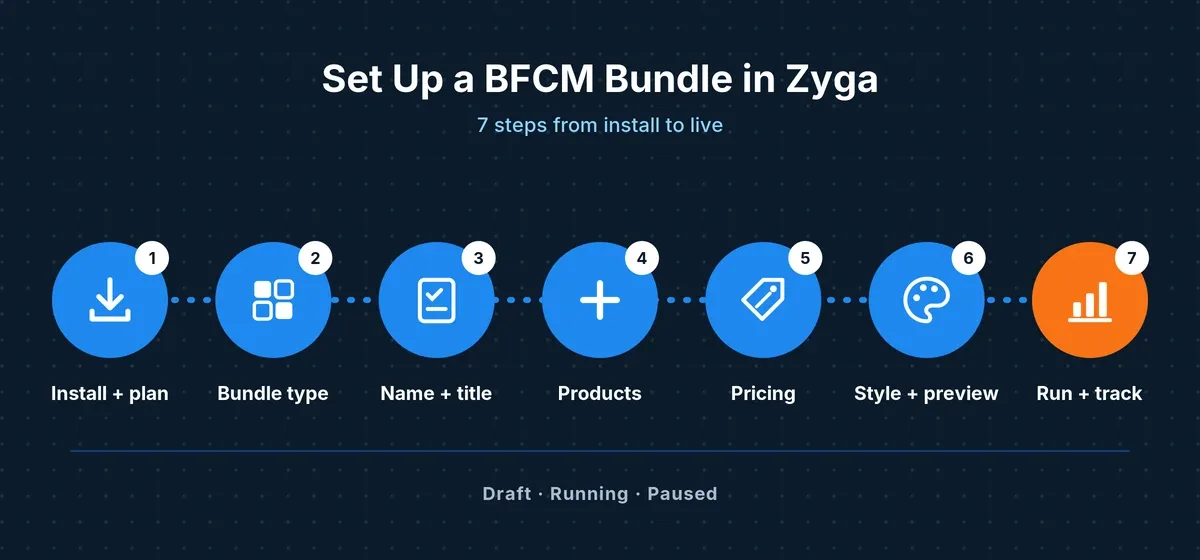
Here’s the good news: all 10 ideas above are built the same way. Learn these 7 steps once, and you can launch every bundle on this list with Zyga Bundles.
Step 1: Install Zyga and Pick a Plan
Install Zyga Bundles from the Shopify App Store. Plans follow your monthly bundle revenue: Launch ($12.99/month, up to $2,500), Grow ($29.99/month, up to $10,000), and Scale ($39.99/month, unlimited). Every paid plan has a 7-day free trial. Size your plan for November, not October.
Step 2: Choose a Bundle Type
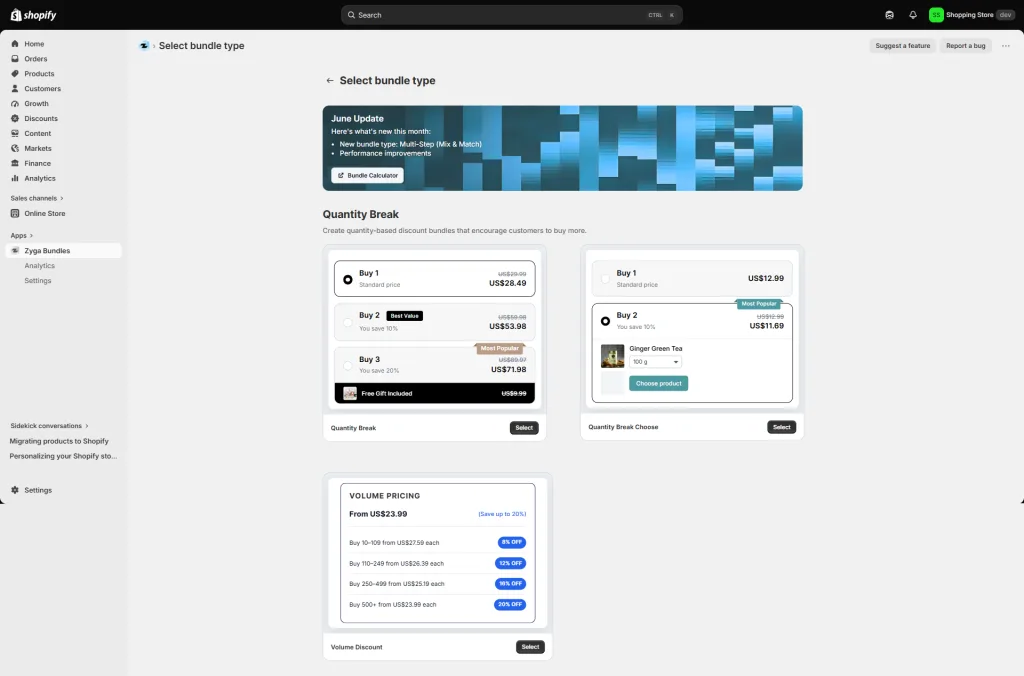
Click Create and pick from Quantity Breaks, Mix and Match, Combos, or Add-ons.
Step 3: Name It and Write the Title
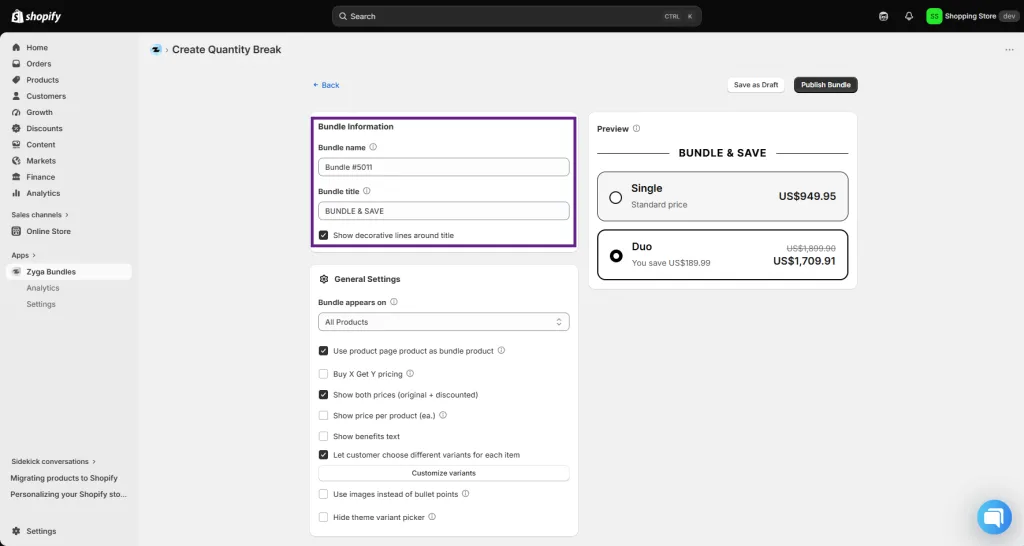
Use an internal name like "BFCM26 Skincare BYOB," then a customer-facing title that states the deal, such as "Pick any 3, save 10%."
Step 4: Choose the Products
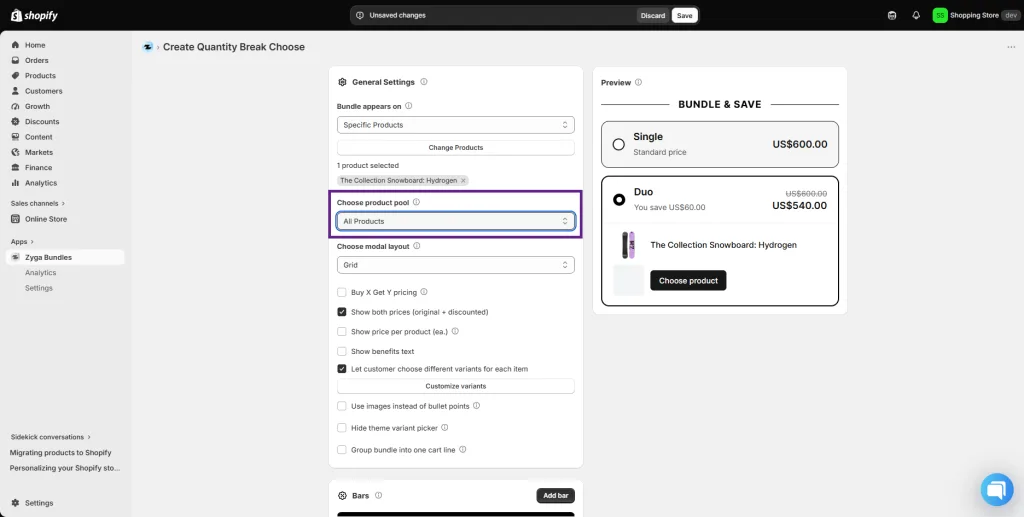
Show the bundle on all products, specific products, or collections. Turn on variant choice if shoppers need sizes, colors, or flavors.
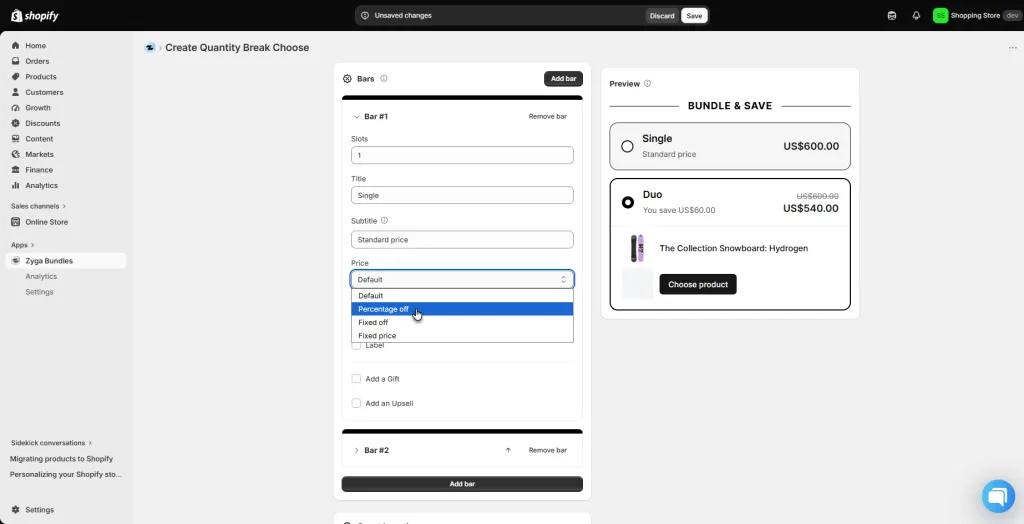
Step 5: Add Your BFCM Pricing
Set percentage off, fixed amount off, or a fixed price. Add a countdown timer to Quantity Break bundles with a custom end date of November 30.
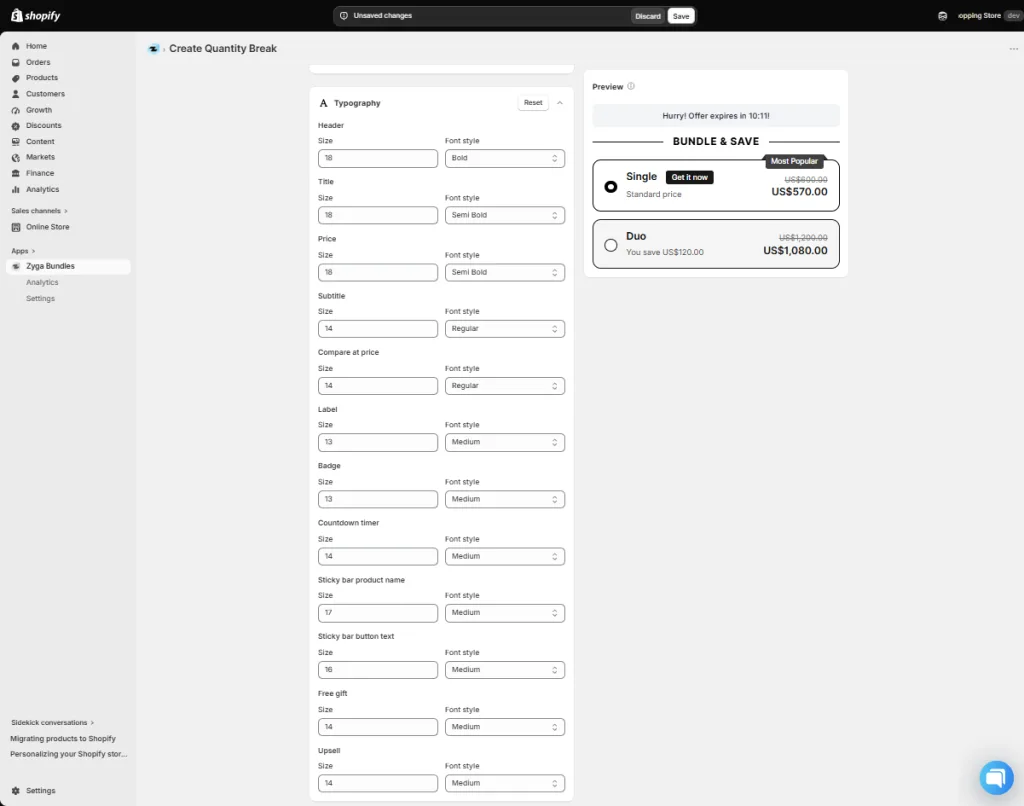
Step 6: Match Your Theme
Pick a color palette and typography. The Live Preview shows the customer view as you edit.
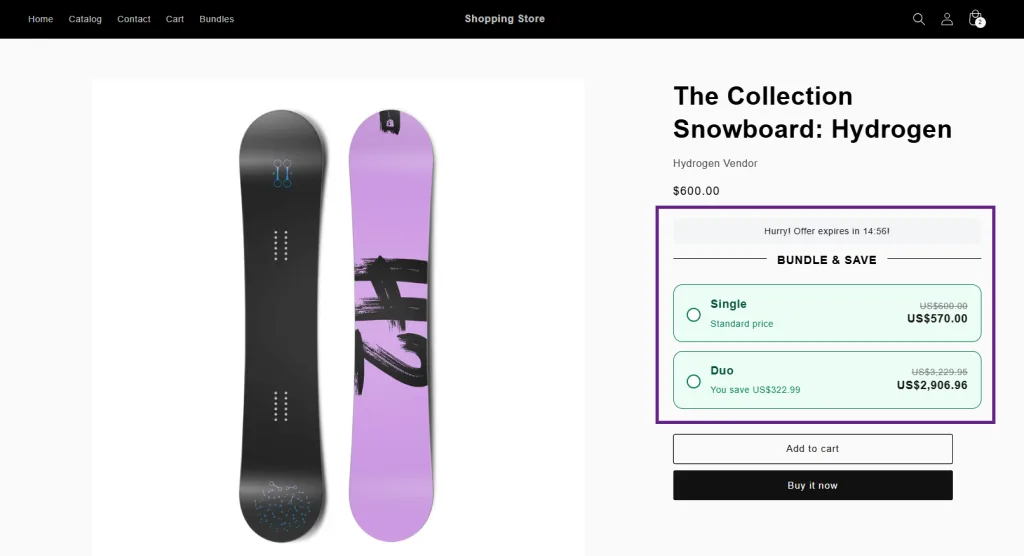
Step 7: Save as Draft, Run, and Track
Save each bundle as a draft, then switch it to Running on launch day. Analytics shows revenue, orders, and AOV for every bundle, so you can duplicate winners and pause the rest.
More detail lives in the Zyga Bundles documentation.
Your BFCM 2026 Bundle Timeline
Phase | Dates | What to do |
|---|---|---|
Build | Now to Nov 8 | Pick 2 to 3 ideas, price them in the calculator, and create every bundle as a draft. |
Test | Nov 9 to Nov 22 | Match your theme, test on a real phone, and set countdowns to November 30. |
Launch | Nov 26 to Nov 27 | Switch bundles to Running and check every product page. |
Run | Nov 27 to Nov 30 | Check Analytics daily. Duplicate winners, pause laggards. |
Wrap up | Dec 1 | Pause or retitle BFCM bundles. Keep your best ones for December. |
Running a cause campaign too? Giving Tuesday falls on December 1. Our Giving Tuesday prep guide covers that timeline.
BFCM Bundle Mistakes to Avoid
Discounting past your margin. A 30% bundle discount on low-margin products can lose money. Check the calculator first.
Launching untested. Don't build bundles the night before. Test on mobile, including variant choice.
Forgetting your plan limit. BFCM can push bundle revenue far above a normal month. Watch the Usage meter.
Leaving BFCM copy up in December. Pause or retitle expired offers on December 1.
Conclusion
BFCM rewards the stores that prepare early. Pick two or three ideas from this list, build them as drafts this week, and let your best sellers do the heavy lifting from November 27 to 30.
Looking for more ways to lift sales this season? See our roundup of Shopify apps to boost sales and engagement.
Install Zyga Bundles on Shopify and launch your first BFCM bundle today.
FAQs
What is a mix-and-match bundle on Shopify?
A bundle where shoppers choose the products, and the discount grows with how many they pick. In Zyga, that's the Build-Your-Own Bundle or the Multi-Step Bundle.
Can I add a Black Friday countdown timer to a bundle?
Yes. Quantity Break and Quantity Break Choose bundles include a countdown timer. Set a custom end date, such as November 30, so every shopper sees the same deadline.
Which Zyga plan do I need for Black Friday?
Choose the plan that covers the bundle revenue you expect in November. The Bundle Profit Calculator recommends a plan based on your projected revenue.
Article by
Muhammad JafferShopify & WooCommerce Expert
Muhammad Jaffer is a WooCommerce and Shopify expert with 7+ years in eCommerce development, SEO, and content. He builds conversion-focused storefront solutions and writes practical guides that help merchants turn traffic into revenue.
View all articlesZyga Bundles
Add Zyga Bundles to your Shopify store
Zyga Bundles: the #1 bundle app for Shopify, built to boost your store's sales and orders. Create fixed bundles, volume discounts, and frequently bought together offers that turn single-item carts into multi-item orders.
There’s More to Read
More practical guides from the Objects team.
 Guides
How to Use Name-Your-Price on Shopify for BFCM 2026
Every store slashes prices over BFCM. Learn how to let shoppers name their price on selected Shopify products, protect your margin with a price floor, and set it up with Offer Your Price before November 27.
by Muhammad Jaffer · October 30, 2026
 Guides
Recurring Donations for Shopify Stores: What It Is and How to Do It
Shopify can't take recurring donations on its own. Learn what recurring giving is, why monthly donors stay for years, and how to set it up with Donate Now before Giving Tuesday.
by Muhammad Jaffer · October 14, 2026
 Guides
Shopify for Nonprofits (2026): Plans, the Donation Gap, and How to Fix It
Shopify works well for nonprofits selling merch and tickets, but its only native donation option is relabeled tipping. Here's what NPO plans include, where native donations fall short, and how to fix the gap online and in person.
by Muhammad Jaffer · October 4, 2026